Create Pipeline Process Steps
Creating a pipeline in the Create Pipeline Process Steps is divided into 5 steps below.
- Input issuer's company information
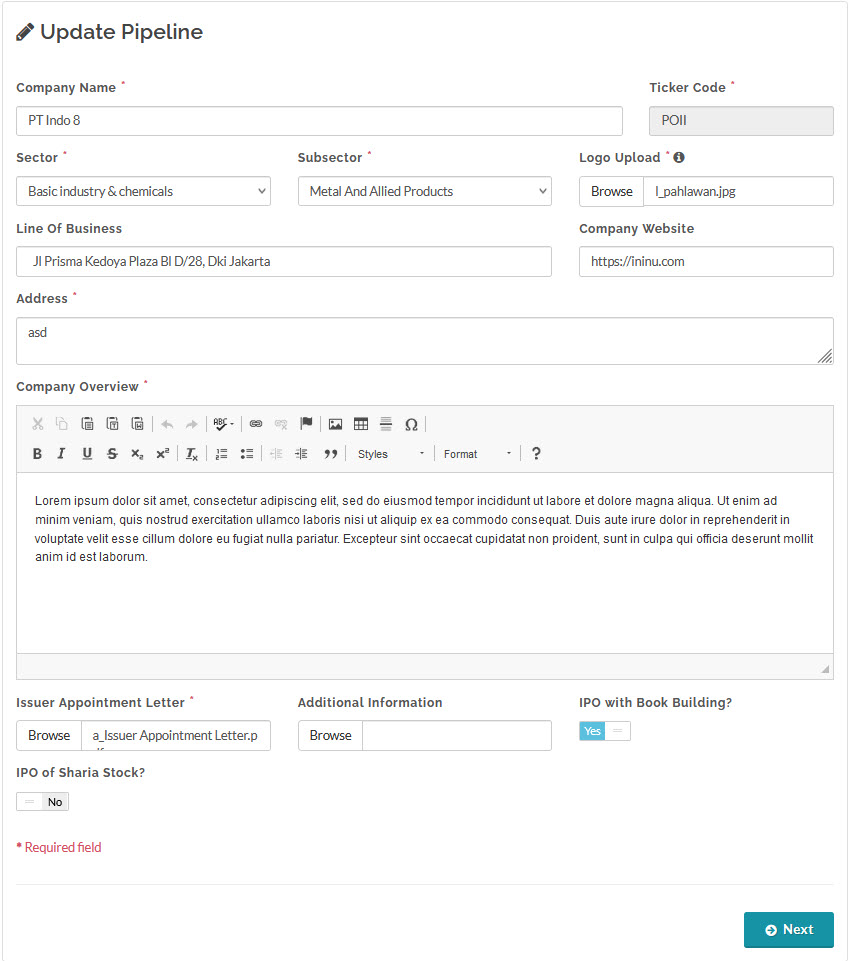
The first step is to input the issuer's data.
In this step you must enter whether the IPO will use a Book Building period, or without a Book Building and directly into Offering.
Fill in the following fields in the input form:
Company Name: Issuer's company name.
Ticker Code: Ticker code used for secondary market trading, four digit alphabet.
Sector: Industry sector of the issuer.
Subsector: Industry subsector of the Issuer.
Logo Upload: Upload issuer's company logo, in png or jpeg format.
Address: Main address of the issuer's.
Company Overview: Brief overview of the issuer's company.
Issuer Appointment Letter: Upload issuer's appointment letter to underwriter, in pdf format.
Additional Information: Upload any additional file pertaining to the IPO, in pdf format, optional.
IPO with Book Building?: Pick "Yes" if IPO includes a book building process, if "No" the IPO will start on the offering stage (without book building).
IPO of Sharia Stock?: "No" for conventional stock, "Yes" for sharia stock.
- Input Initial Public Offering Information
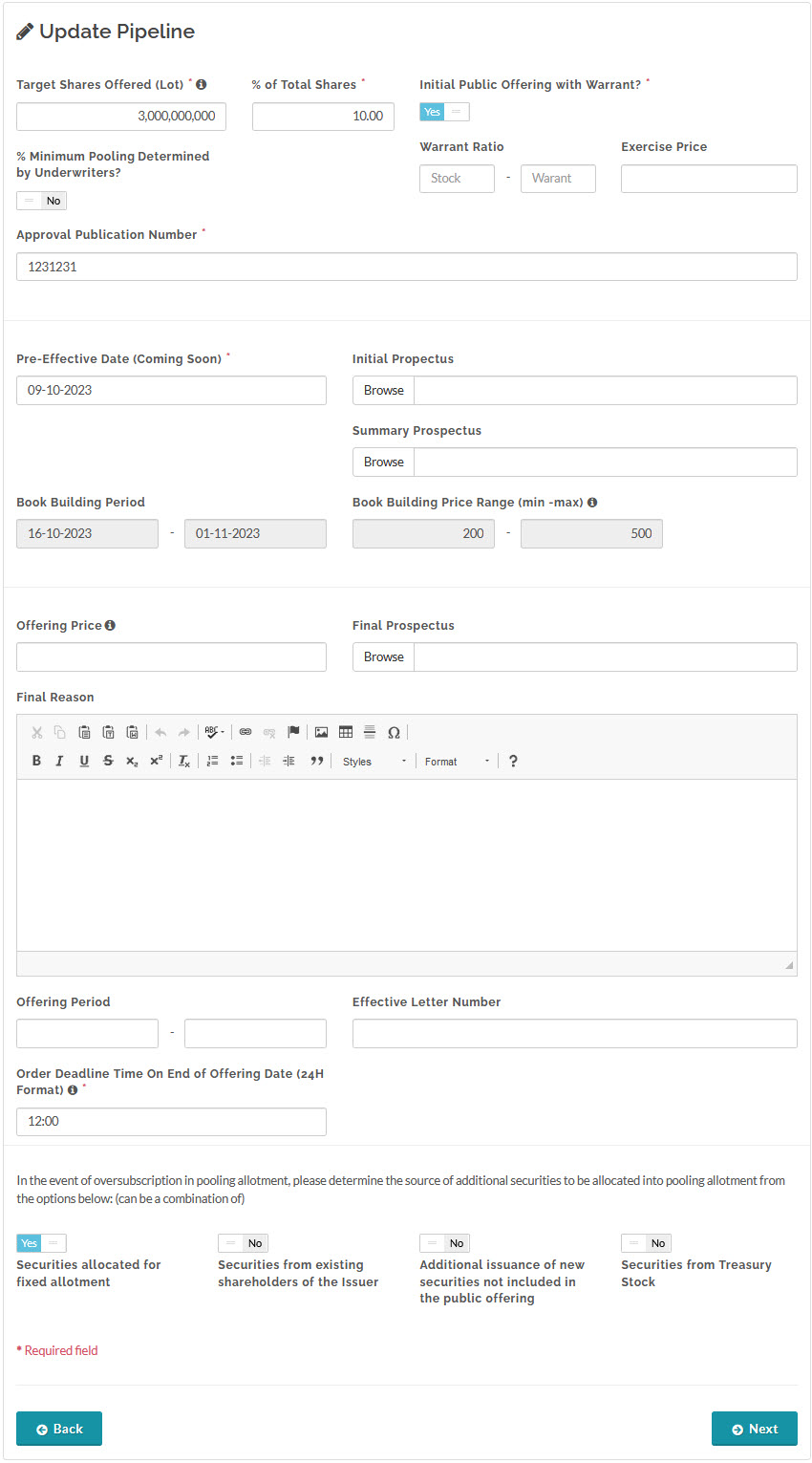
The second step is to input the IPO information. Note that In this step you must enter which of the sources of additional securities to be allocated into pooling allotment in the event the IPO is oversubscribed.
Fill in the following fields in the input form:
Target Shares Offered (Lot): Number of shares in Lot offered in the IPO.
% of Total Shares: The percentage of shares offered in the IPO relative to the total number of shares available.
Initial Public Offering with Warrant: "No" for IPO without warrant, "Yes" for IPO with warrant.
Warrant Ratio: Ratio of stock to warrant, only for IPO with warrant.
Exercise Price: Exercise price of warrant, only for IPO with warrant.
% Minimum Pooling Determined by Underwriter: The Minimum Pooling entered here will be compared to the Minimum Pooling provisioned in OJK Regulation, and only the greater of the two will be applied.
Approval Publication number: IPO publication approval number .
Pre-Effective Date (Coming Soon): IPO Pre-effective date.
Initial Prospectus: Initial prospectus file, in pdf format.
Summary Prospectus: Summary prospectus file, in pdf format.
Book Building Period: Start date and end date for the book building period, for IPO with book building.
Book Building Price Range (min-max): Minimum and maximum price for the book building period, for IPO with book building.
Offering Price: The IPO offering price, can be empty during the pre-effective and book building period.
Final Prospectus: Final prospectus file, in pdf format.
Final Reason: Explanation for choosing the offering price.
Offering Period: Start date and end date for the offering period.
Order Deadline Time on End of Offering Date (24H Format): The deadline time an order can be made on the last offering day of offering (end offering date).
Effective Letter Number: IPO effective letter number.
In the event of over-subscription in pooling allotment, you can determine the source of additional securities to be allocated into pooling allotment from the following options (can be a combination of):
- Securities allocated for fixed allotment
- Securities from existing shareholders of the Issuer
- Additional issuance of new securities not included in the public offering
- Securities from Treasury Stock
- Input underwriters' allotment portions
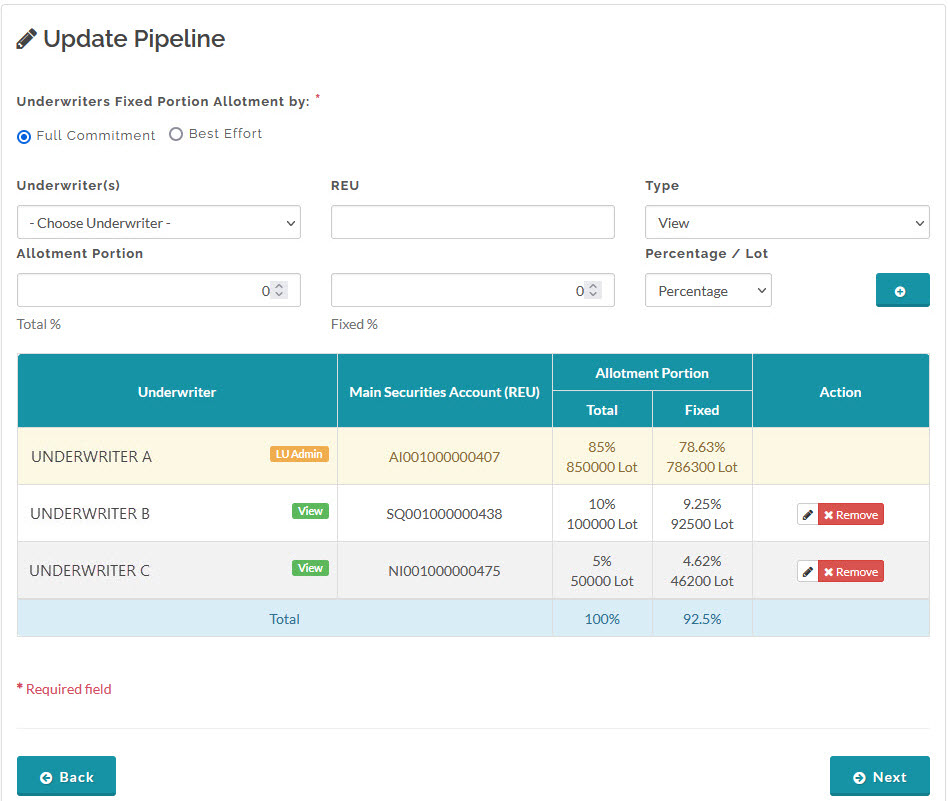
In this step, you need to input the allotment portion for each underwriter. When you initiate a pipeline with Book Building you can skip this step and go back later to input them during the Offering period. If you initiate a pipeline without Book Building or if the pipeline is already in the Offering period, you need to go to this step and fill in the form.
The allotment portion for each Pool and Fixed Order is formulated to OJK Regulation.
- Clawback Setting (Input source of securities to be allocated in case of over-subscription)
In this step, the input fields shown are determined during the second step. Choose the sources of additional securities in the second step of the Create Pipeline Process Steps, the chosen fields will appear in this step for you to input. If you want to change the settings again, click the Back button until you get to the second step and edit the selection.
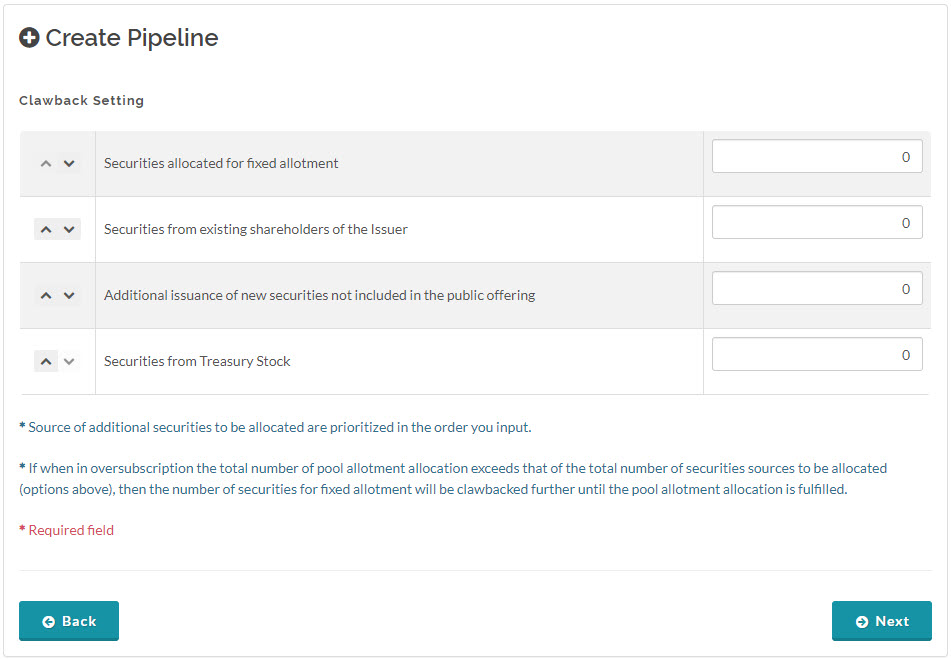
 Source of additional securities to be allocated are prioritized in the order you input from top to bottom row. In the event an over-subscription occurs, if the total number of pool allotment allocation exceeds that of the total number of securities sources to be allocated, then the number of securities for fixed allotment will be claw-backed further until the pool allotment allocation is fulfilled.
- Registrar Information
This step is optional. You can select registrars and input their email addresses. Offering information for the IPO will be sent to the registrars' emails on the distribution day (1 business day after the end offering date). The information included in the emails are: the Issuer's company name, ticker code, total available funds (value of allotted shares in IDR), price per share, total deposited shares, and total deposited warrants.

- Check data
Before saving the pipeline, the final step is to review your data. You have the option to go back to the previous steps to make any necessary edits to the pipeline. Once the pipeline is saved, its status is set to Initiation. An initiated pipeline is not yet published for public view; only the pipeline creator (i.e., the Admin Lead Underwriter) has the privilege to view it.

Created with the Personal Edition of HelpNDoc: What is a Help Authoring tool?