Underwriters' Allotment Portion
If you are the Admin Lead Underwriter (Pipeline initiator), you may need to allocate the Fixed Allotment portion to other underwriters. The fixed allotment portion can be allocated and adjusted in the Create Pipeline Form only during the Offering period.
To allocate or adjust the Allotment portion:
- Go to Pipeline.
- Select Pipeline > Update
 .
.

- Click the Next button until you get to the Underwriters Fixed Portion Allotment step, as depicted below:
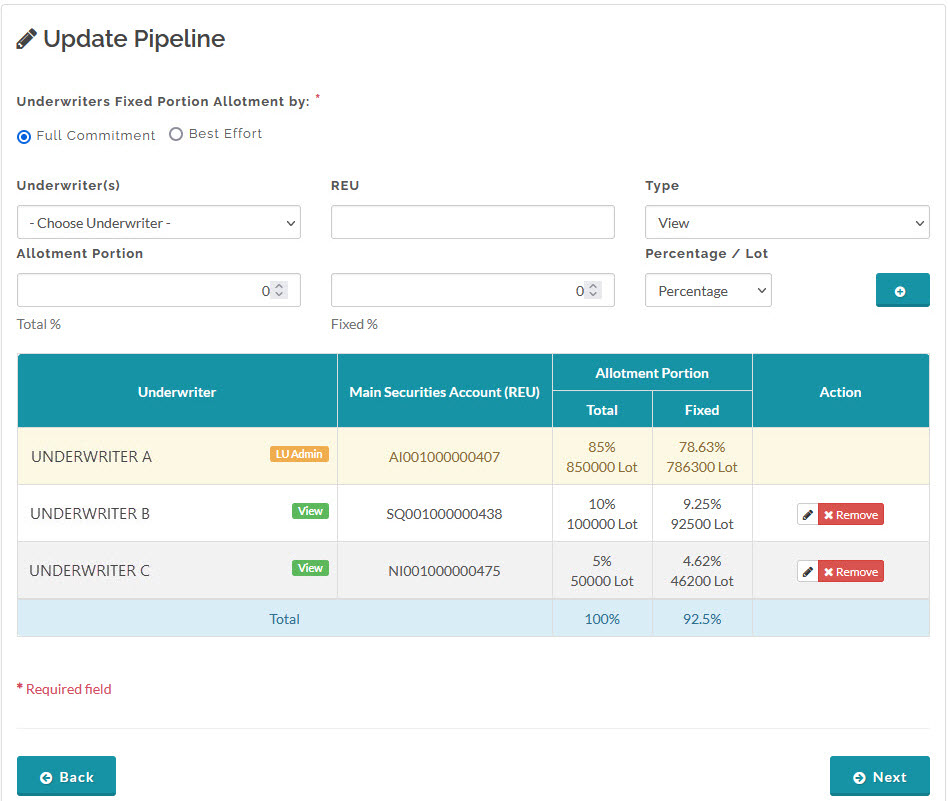
- Input and make the necessary adjustment to the Fixed Allotment portion values in the fields provided.
- When you have finished, click the Next button again until you reach the last step in the Create Pipeline Process Steps and click Save.
 For Admin Lead Underwriter: You will not be prompted to input the underwriters' allotment portion when you initiate a pipeline with a Book Building period. However, you will need to update the pipeline and input or adjust the underwriters' allotment portion after the pipeline is published to Offering.
Created with the Personal Edition of HelpNDoc: Make CHM Help File Creation a Breeze with HelpNDoc