Manage Order
The contents of Manage Order
- View Index Order
- Create/Update Order
- View a Single Order
- Approve Order
- Propose Order For Approval (For Non-Exchange Member Participant)
- Reject Order
- Amend Order
- Cancel Order
- View Allocated Order
- Upload For Order Exception
Order Management enables you to manage IPO orders made by you (participant) or by your investors.
You can keep track of order statuses from each investors as they progress through from Book Building to Offering to Allotment.
The order approval flow can be briefly summarized in the following diagram:
Order Input by Participant:

Order Input by Non-Exchange Member Participant:
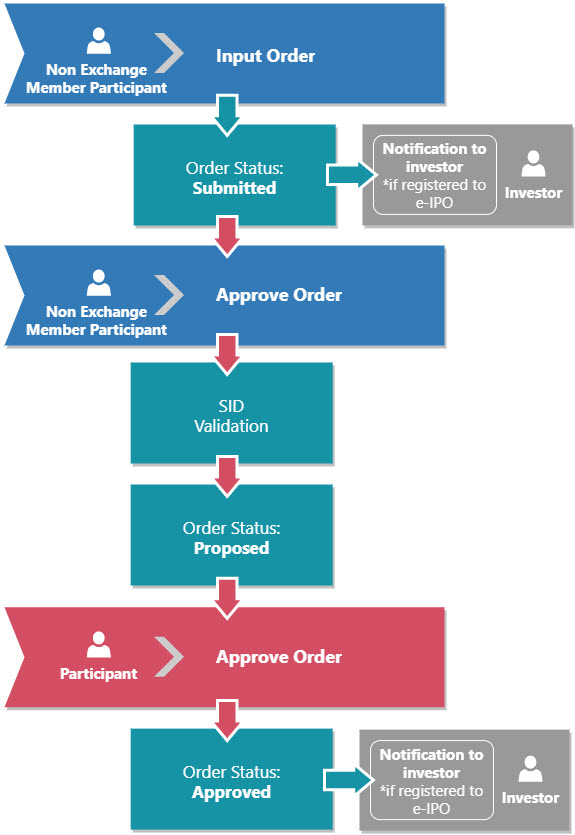
Order Input by Investor:

Order Statuses:
|
Order Status |
Description |
|
|
Submit order by filling in the order form. |
|
|
Non-Exchange Member Participant proposes an order to be approved by the parent Exchange Member Participant. |
|
|
Participant verifies and approve the order, investor confirmed have read the prospectus. |
|
|
Participant verifies and approve the order, investor have not read the prospectus. |
|
|
Participant verifies and reject an order. |
|
|
SID and SRE invalid after KSEI validation. |
|
|
Order not carried over, i.e. order price made during Book Building below Offering price. or Insufficient fund after KPEI validation. or During the Offering period, Investor did not confirm an order that was made in the Book Building period. |





Created with the Personal Edition of HelpNDoc: Full-featured EBook editor